Many Volvo owners slide into a new car and feel a bit unsure. The big screen looks sleek, yet the menus feel unfamiliar. Because two very different systems exist, confusion spreads fast. Some cars run one setup, while newer ones run another. So owners often ask friends, forums, or the dealer for help. This is where Volvo Sensus vs Google built-in becomes a common search for drivers. Understanding your exact system saves time, stress, and frustration every day. At Auto Intuitive, we coach Volvo owners in Reno, NV, until the screen feels simple. Our driver assistance coaching in Reno NV helps you master safety features, too. Moreover, we keep each session calm, clear, and friendly. So if your Volvo tech feels puzzling, help is close by. This guide breaks down both systems in easy steps.
Two Systems Living Inside Volvo Cars
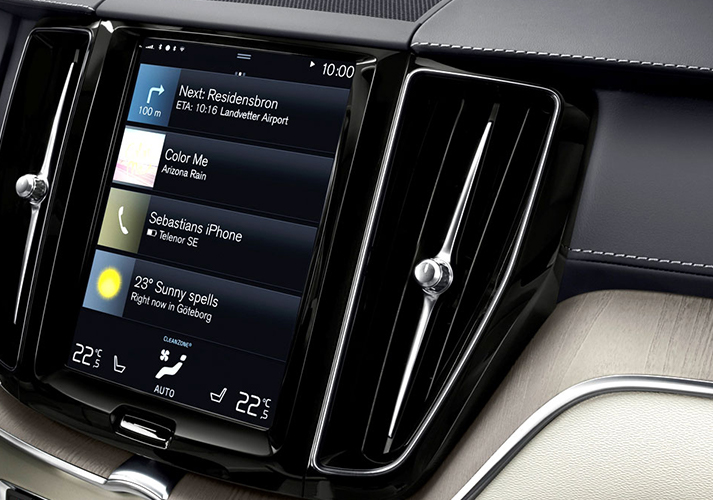
Volvo has used two main screen systems over the past few years. Older models came with one design, and newer models switched to another. Because of this shift, owners can feel unsure which one they have. Getting Volvo Sensus explained clears up that confusion right away. Sensus is the older setup that many Volvos still use today. It handles maps, music, phone, and car settings on one screen. Newer Volvos run a system powered by a well-known tech partner instead. Having the Volvo Google built-in explained helps owners see what changed and why. Both systems ultimately aim for the same goal. So they run your maps, media, and settings in one place. However, they reach that goal in different ways.
What Makes These Screens Feel Different
The two systems share a purpose, yet they feel unique to use. Their menus, icons, and layouts follow different design ideas. Understanding these differences in Volvo infotainment systems helps you drive with more confidence. Sensus uses its own built-in maps and menu style. The newer setup leans on familiar apps and voice tools instead.
Here is how the two systems compare at a glance:
- Sensus runs Volvo’s own maps and menus.
- Google built-in uses popular map and voice apps.
- Both control media, phone, and car settings.
Because the layouts differ, muscle memory from one may not help on the other. However, the basics feel easy once someone shows you the pattern. Moreover, a short lesson makes it easy to click the screen quickly. So the right guidance turns confusion into comfort.
A Closer Look At The Sensus Setup
Sensus has served Volvo drivers well for many years. It keeps your key features grouped into tidy tiles. Exploring Volvo Sensus Connect features shows how much this system can do. You get maps, radio, phone links, and vehicle settings together. Because everything sits on one screen, you rarely feel lost.
Connecting a phone is one of the first steps owners try. Setting up Volvo Sensus Bluetooth takes only a minute after a quick tour. You open the phone menu, turn on Bluetooth, and pick your device. After that, the car remembers your phone for future drives. Moreover, Sensus lets you easily save your radio and comfort choices. So your daily drive feels personal and smooth. With a little practice, the whole screen feels natural.
A Closer Look At The Google Built-In Setup
Newer Volvos run a screen built around familiar tools. This design feels comfortable because the apps look well-known. Exploring Volvo with Google built-in features reveals maps, voice help, and an app store. Because these tools are updated frequently, the car keeps improving over time. You get fresh features without a trip to the dealer.
Setting up apps is simple once you learn the flow. Managing the Volvo Google built-in app setup lets you add tools you use most. Open the app area, select your apps, and sign in. After that, your favorites sit right on the home screen. Moreover, spoken help makes many tasks feel effortless. Using Volvo Google built-in voice commands lets you set maps or make calls hands-free. So you keep both hands on the wheel while driving.
How Navigation Compares On Both Screens
Maps matter to almost every driver on every trip. Both systems guide you, yet they feel different on the road. Comparing Volvo Sensus navigation to Google Maps helps owners choose the flow they prefer. Sensus uses its own map system with clear, steady directions. The newer setup leans on a popular map app many people already trust.
Because the newer maps update often, traffic and routes stay fresh. However, plenty of drivers still love the simple feel of Sensus. So neither choice is wrong for daily driving. It comes down to what feels natural for you. Moreover, learning small map tricks makes any trip smoother. A quick lesson shows you shortcuts you might miss. That knowledge makes every drive easy.
Using Apple CarPlay And Android Auto
Many drivers want their phone apps on the big screen. Both Volvo systems support this feature in helpful ways. With Volvo Sensus Apple CarPlay, your iPhone maps and music appear onscreen. You connect through the phone menu and follow the simple prompt. Because it mirrors familiar apps, it feels comfortable fast.
The newer system also offers phone linking. Using Volvo Google built-in Apple CarPlay, iPhone owners see their trusted apps again. Android owners get support too, and here is where it helps.
Keep these phone-linking points in mind:
- Volvo’s Google-built-in Android Auto brings Android apps onscreen.
- A strong cable or wireless link keeps things steady.
- Updated software helps every connection run smoothly.
So both systems welcome your phone with open arms. Moreover, a short session quickly clears up any pairing issues.
Keeping Your Volvo Screen Current
Software keeps your Volvo screen fresh and useful over time. Updates can fix small bugs or add handy new tools. A Volvo Sensus software update improves how the older system runs. Because these updates arrive quietly, you often notice only the results. Newer Volvos update in a similar, easy way. A Volvo Google built-in software update brings new apps and small fixes. So your car keeps getting better while it sits in the driveway.
Many owners wonder whether to switch between the two systems. The question of can Volvo Sensus upgrade to Google built-in comes up often. The answer depends on your exact model and its build. However, a knowledgeable guide can explain your options clearly. Moreover, we help owners understand what their specific Volvo supports. That clarity saves you from guessing or worrying.
Picking The Right Coaching Session For You
Learning your Volvo works best with patient, one-on-one help. That is why we offer clear sessions built around real needs. Below is a simple table of what each option includes. Because every owner starts at a different point, both choices help.
| Session | Time | Price | Best For |
| Overview and Essentials | 40 minutes | $100 | New owners learning key features, menus, and alerts |
| Deep-Dive Walkthrough | 90 minutes | $250 | Owners wanting advanced features, settings, and hands-on practice |
The shorter session covers the daily basics you use most. However, the longer session digs into deeper features and updates. So you pick the one that matches your comfort level. Moreover, both sessions stay calm, friendly, and pressure-free. Our goal is a Volvo screen that finally feels simple.
Making Sense Of The Volvo Cars App
Your phone can connect to your Volvo from outside the car. The Volvo Cars app handles remote features from your hand. Because the two systems differ, this app behaves differently. Learning the Volvo Cars app Sensus vs Google built-in setup avoids common mix-ups. Owners with older cars follow one path to link the app. Newer owners follow a slightly different path instead. So knowing your system prevents wasted time and stress. Moreover, the app can display fuel level, location, and lock status. A quick walkthrough makes the whole setup feel easy. We guide owners through each step at a calm pace. That way, your phone and car work together smoothly. Real help beats scrolling through confusing menus alone.
Where Volvo Owners Find Friendly Help Nearby
Confusing tech should never make driving stressful. Yet many owners feel stuck without clear, patient support. Good Volvo infotainment help for owners turn worry into real confidence. Because we teach rather than sell, our time stays fully focused on you. Our coaching covers both Sensus and the newer Google-powered screen.
Local drivers often search for a car technology tutor near me Reno NV, who truly listens. We serve Volvo owners across Sparks, Carson City, and the wider area. So you leave each session knowing your maps, apps, and settings. Moreover, these skills stay with you for the life of your car. Patient guidance makes any Volvo screen feel truly yours.
Drive With Confidence, Starting Today
Modern Volvos pack smart tech, yet that tech can feel overwhelming. However, the right help turns confusion into calm, skillful action fast. At Auto Intuitive, we teach Volvo owners across the Reno area every week. Because we coach rather than sell, each lesson centers on you. You will finally understand your screen, your maps, and your settings. Moreover, you gain confidence that you keep for years of driving. So the fear of tapping the wrong button fades. Whether your Volvo runs Sensus or the newer system, help is ready. Call us at (775) 420-2678 to book your session today. Let us make your Volvo feel simple, clear, and fun again.
FAQs
What is the main difference between Volvo Sensus and Google built-in?
Sensus is Volvo’s older system with its own maps and menus. Google built-in is the newer setup that uses familiar apps, voice tools, and an app store. Because the newer system updates often, it adds features over time—control maps, media, phone, and settings in one place.
Can a Volvo with Sensus be upgraded to Google built-in?
Whether a Sensus Volvo can switch depends on your exact model and build. Some cars support it, while many do not, because the hardware differs. However, a knowledgeable guide can explain your options clearly. We help owners understand exactly what their specific Volvo supports before they make a decision.
Does Volvo’s Google-built-in replace Apple CarPlay or Android Auto?
No, the Google built-in system does not replace phone mirroring. You still connect Apple CarPlay for iPhone apps and Android Auto for Android apps. Because the system supports both, you keep your favorite phone tools. Moreover, updated software helps these connections run smoothly on your Volvo screen.
Why is the Volvo Cars app setup different on Sensus and Google built-in models?
The app connects differently because the two systems are built differently. Older Sensus cars follow one linking path, while newer models follow another. So the steps and screens vary between them. Knowing your exact system prevents confusion and speeds up the setup.
Can Auto Intuitive help Volvo owners understand Sensus or the Google-built-in system?
Yes, that’s exactly what we provide at Auto Intuitive. We coach Volvo owners through both systems at a calm, patient pace. Because we teach instead of sell, you keep these skills for good. So you gain lasting confidence without having to make repeated trips for help.