
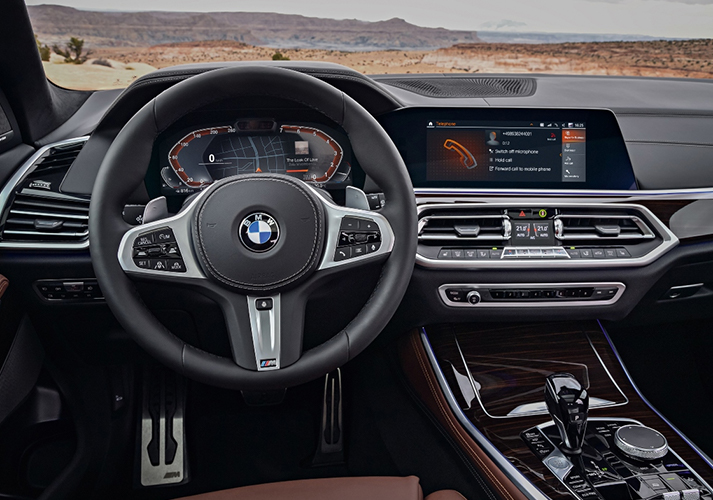
Many BMW owners sit in a brand-new car and feel a little lost. The screen looks bright and modern. Yet the menus feel deep, and the buttons feel new. As a result, simple tasks can take too long. Pairing a phone or changing a setting can turn stressful fast. This is the exact spot where BMW iDrive 7 explained becomes so helpful for drivers. At Auto Intuitive, we coach BMW owners in Reno, NV, so their cars feel easy again. Our job is to teach, not to sell or repair anything. We offer automobile technology coaching in Reno NV, for drivers who want clear guidance.
Moreover, we keep things calm, clear, and friendly during every session. So if your car tech feels confusing, you are not alone. This guide walks through the basics every owner should understand. After that, the whole system starts to make real sense.
What BMW iDrive 7 Actually Does For You
BMW iDrive 7 is the brain behind your dashboard screen. It controls your maps, music, phone, and car settings. Because it links so many features, it can feel busy at first. However, once you learn it, the design follows a simple idea. Everything lives inside clear menus that you can reach quickly.
Drivers who understand this BMW Operating System 7 guide feel far more relaxed behind the wheel. The system shows helpful alerts while you drive. So you get useful information without having to dig through pages. Many owners never learn even half of what their car offers. That gap is exactly why coaching helps so much. Having BMW iDrive 7 explained by a patient guide helps the screen feel less like a puzzle.
Getting Comfortable With The Home Screen
The home screen is your starting point for almost everything. It greets you each time your BMW wakes up. Because it holds so much, first-time owners often feel unsure where to tap. However, the layout stays steady once you know the pattern. Learning how to use BMW iDrive 7 starts right here on this screen.
You can control the home screen in a few easy ways:
- Tap the touchscreen directly with your finger.
- Turn the round controller near the gear area.
- Use steering wheel buttons to move without reaching.
Each method reaches the same menus, so pick what feels natural. Moreover, you can switch between them anytime you like. Some owners prefer the controller for steady, safe control. Others love the quick tap of the touchscreen. With practice, the whole thing becomes second nature.
Understanding The Main Menu And Widgets
The main area is divided into several important zones. Once you spot them, everything else clicks into place. The BMW iDrive 7 main menu groups your most important features in a tidy row. You will find maps, media, phone, and car settings there. Because these sit together, you rarely hunt for anything.
The screen also shows small, live tiles you can rearrange. These BMW iDrive 7 widgets display maps, music, or trip details at a glance. So you see what matters without opening a full page. You can slide these tiles to match your daily habits. Moreover, this setup keeps your eyes on the road longer. A tidy screen means fewer taps while driving. That small change makes every trip feel smoother and safer.
Setting Up Your Phone And Apple CarPlay
Your phone becomes part of the car once you connect it. This step matters because it powers calls, texts, and music. Handling BMW iDrive 7 phone pairing takes only a minute after you learn it. You open the menu, turn on Bluetooth, and select your phone. After that, the car remembers your device for next time.
Many drivers want their apps on the big screen too. The BMW iDrive 7 Apple CarPlay setup lets you access maps and music from your iPhone. Because it mirrors your familiar apps, it feels instantly comfortable. You connect through the phone menu and follow the on-screen prompt. However, a weak cable or old software can slow things down. So a quick check of both usually fixes small hiccups. Once linked, your favorite apps appear right where you need them.
Making The Car Feel Like Yours
Every driver has different tastes, and your BMW knows that. It can remember your seat, mirrors, and screen choices. Setting up BMW iDrive 7 driver profiles saves these preferences under your name. Because of that, the car adjusts the moment you get in. Two people can share one BMW without constant resetting.
You can fine-tune how maps behave on your trips too. Adjusting BMW iDrive 7 navigation settings changes route options, map views, and traffic alerts. So your maps match how you actually like to drive. Moreover, these small tweaks make long trips less tiring. A profile built around you feels natural every single day. This personal touch is a big reason coaching pays off. When the car fits you, driving gets genuinely enjoyable.
Exploring The My Car Menu And Safety Features
The car keeps its own controls in one central place. This is where you manage comfort, safety, and vehicle info. The BMW iDrive 7 My Car menu holds settings for lights, doors, and alerts. Because it gathers so much, it deserves a slow, careful tour.
Your BMW comes with smart helpers that watch the road too. Reviewing BMW iDrive 7 driver assistance settings lets you control lane and speed features. So you decide how much help the car gives you. However, these tools work best when you understand them fully. That understanding is exactly what good coaching provides. In fact, many owners feel safer once these features make sense. A confident driver uses safety tech effectively.
Handling Updates, Reboots, And Voice Tools
Your BMW can improve over time through software updates. These updates arrive without a trip to the dealer. A BMW iDrive 7 remote software upgrade adds new features or fixes small bugs. Because it works quietly, you often notice only the results. Understanding your BMW iDrive 7 after a software update helps you spot new changes fast.
Sometimes the screen freezes or acts a little slow. A simple reboot of the BMW iDrive 7 clears the glitch in most cases. You hold the controls for a moment, and the system restarts. Moreover, your car listens and responds to spoken requests. Using BMW iDrive 7 voice commands lets you set maps or make calls hands-free. So you keep both hands on the wheel while you drive. These tools feel like magic once you try them.
A Quick Look At Session Options
Learning your car works best with steady, patient help. That is why we offer clear sessions built around real needs. Below is a simple table of what each option includes. Because every owner starts at a different point, both choices help.
| Session | Time | Price | Best For |
| Overview and Essentials | 40 minutes | $100 | New owners learning key features, menus, and alerts |
| Deep-Dive Walkthrough | 90 minutes | $250 | Owners wanting advanced features, settings, and hands-on practice |
The shorter session covers the daily basics you use most. However, the longer session digs into deeper features and updates. So you pick the one that fits your comfort level. Moreover, both sessions stay friendly, calm, and pressure-free. At Auto Intuitive, our goal is a car that finally feels simple to you.
Finding The Extras Most Owners Never Touch
BMW packs in clever tools that many drivers never find. These hidden gems can make daily driving much easier. Some BMW iDrive 7 owners miss hidden settings for control, comfort, display, and shortcuts. Because they sit deep in the menus, people overlook them for years.
A few common extras worth exploring include:
- Custom shortcut buttons for your top features.
- Display tweaks that reduce nighttime glare.
- Comfort settings for climate and seating.
You can wave your hand for certain screen actions with BMW iDrive 7 gesture control. So a simple motion adjusts volume or answers a call. Moreover, these touches make the car feel modern and fun. Learning them takes only a short, guided session. That small effort unlocks features you already paid for.
Where To Turn When The Manual Feels Heavy
Thick guidebooks can overwhelm even patient owners. Nobody wants to read hundreds of pages after a long day. A printed BMW iDrive 7 owner manual holds every detail, yet it feels dense. Because of that, many owners skip it and stay confused. That is where friendly, one-on-one help changes everything.
Real coaching gives you answers in simple, easy steps. Getting BMW iDrive 7 explained in person beats hunting through a heavy book. So you learn only what matters for your daily driving. Moreover, we focus on your car, not a sales pitch or repair. Our BMW technology coaching in Reno NV helps owners across Sparks, Carson City, and beyond. With patient support, your BMW starts to feel truly yours.
Driving Away With Real Confidence
Modern cars pack amazing tech, yet that tech can feel scary. However, the right help turns confusion into calm confidence fast. At Auto Intuitive, we teach BMW owners across the Reno area every week. Because we coach rather than sell, our time stays fully focused on you. You leave each session knowing your screen, your menus, and your settings.
Moreover, you gain skills you keep for the whole life of your car. So the fear of tapping the wrong thing fades away. Your BMW should feel exciting, not stressful, from the first drive. Call us at (775) 420-2678 to book your session today. Let us make your car feel simple, clear, and fun again.
FAQs
What is BMW iDrive 7, and how is it different from older BMW systems?
BMW iDrive 7 is the software that runs your car’s main screen. It controls maps, media, phone, and vehicle settings in one place. Compared with older systems, it offers a cleaner layout, live tiles, touch control, and remote updates. So daily tasks feel faster and far more modern.
Where can I find the key settings in the BMW iDrive 7 My Car menu?
You reach the My Car area through the main menu on your screen. Inside, you manage lights, doors, comfort, alerts, and safety helpers. Because everything sits together, you rarely search long for a control. However, a short coaching session makes this menu even easier to master fully.
How do I set up driver profiles, phone pairing, and Apple CarPlay in BMW iDrive 7?
You open the settings menu and create a profile under your name. It automatically saves your seat, mirror, and screen choices. For phone pairing, you turn on Bluetooth and select your device. Apple CarPlay connects through the phone menu and mirrors your familiar apps onto the screen.
What should BMW owners check after an iDrive 7 software update?
After an update, owners should review menus, shortcuts, and driver assistance settings. Because updates can move or add features, a quick look prevents confusion. You should confirm that phone pairing and profiles still work. Moreover, a reboot can clear any minor glitch that may appear after installing new software.
Can Auto Intuitive help BMW owners understand iDrive 7 without going back to the manual?
Yes, that’s exactly what we provide at Auto Intuitive. We coach BMW owners through every menu, setting, and feature at a calm pace. Because we teach instead of sell, you keep these skills for good. So you gain lasting confidence without having to make repeated trips for help.